Internet connectivity is the invisible lifeline that keeps businesses thriving. Whether you run a small startup or a large enterprise, having the right business broadband solution can make the difference between productivity and frustrating bottlenecks that cost you time, money, and opportunities. But what is business broadband, and how does it differ from standard residential internet?
TL;DR
- Business broadband is commercial-grade internet built for reliability, adding uptime SLAs, 24/7 support, static IPs, and stronger security that residential plans, built for casual use, leave out.
- Beyond the five connection types, the bigger choice is shared versus dedicated bandwidth: dedicated guarantees symmetrical speeds and uptime, while shared costs less but slows at peak times.
- Pricing ranges widely, from roughly $50 a month for cable or DSL to $500 to $1,500 or more for dedicated access, before setup, equipment, and taxes.
- Choosing a provider comes down to matching speed and bandwidth to how your team actually works, prioritizing strong uptime guarantees, and weighing total cost over the headline price.
In this guide, we’ll explain the fundamentals of business broadband internet, explore different types of broadband for business, and share tips on how to choose the best business broadband solutions for your organization.
What Is Business Broadband Internet?
Business broadband refers to high-speed internet services specifically designed for professional environments. Unlike residential broadband, which is primarily focused on entertainment and casual browsing, business broadband is built to meet the demands of modern workplaces.
Some key features of business broadband are:
- Higher Speeds: Faster upload and download speeds to support cloud computing, video conferencing, and large file transfers.
- Dedicated Support: Priority customer service and technical support to minimize downtime.
- Enhanced Security: Built-in protections like firewalls, VPN options, and DDoS mitigation.
- Static IP Addresses: Essential for hosting websites, remote access, and VoIP services.
- Service Level Agreements (SLAs): Guaranteed uptime and performance levels that ensure your internet connection remains reliable.
For organizations that rely on stable and high-performing internet for their operations – which is essentially all of them – business broadband solutions are the superior choice over residential connectivity.
Business Broadband vs. Residential: Key Differences
Business and residential broadband can run over the same physical lines, but the service wrapped around each one is built for different priorities. Residential plans are tuned for streaming, browsing, and casual use on a best-effort basis. Business plans add the guarantees and features a company needs to keep operating. Here's what separates them:
- Uptime guarantees: Residential plans offer none. Business plans back performance with an SLA, typically 99.9% uptime or higher.
- Customer support: Residential support runs on business hours and consumer queues. Business support is usually 24/7 with faster response times.
- Static IP addresses: Rarely available on residential plans, standard on business ones, and necessary for hosting, VPNs, and some VoIP setups.
- Upload speeds: Residential connections often throttle uploads. Business fiber and dedicated lines deliver symmetrical or near-symmetrical speeds.
- Data caps: Common on residential plans, usually absent on business service.
- Price: Business broadband typically costs 30–50% more than a comparable residential plan.
The baseline itself has moved. As of 2024, the Federal Communications Commission defines broadband as at least 100 Mbps download and 20 Mbps upload, up from the old 25/3 Mbps standard.[footnote 4] Meeting that floor isn't the same as running a business-grade connection, since the FCC benchmark says nothing about uptime guarantees, support, or symmetrical speeds.
One practical warning: many residential plans prohibit commercial use in their terms of service. A solo freelancer working from home may be fine on a residential connection. Once a team, customer payments, or a public-facing website depend on the link, business broadband's reliability usually justifies the added cost.
Types of Broadband for Business
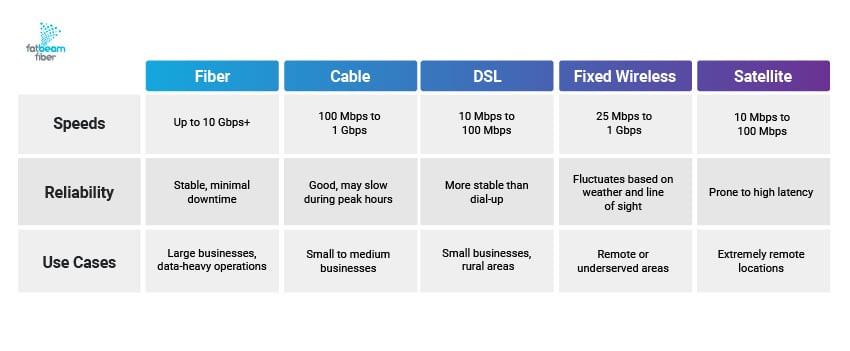
There are several types of business broadband internet options available, each with different levels of speed, reliability, and use cases. Here’s a quick breakdown of each:
Fiber Optic Business Broadband Solutions
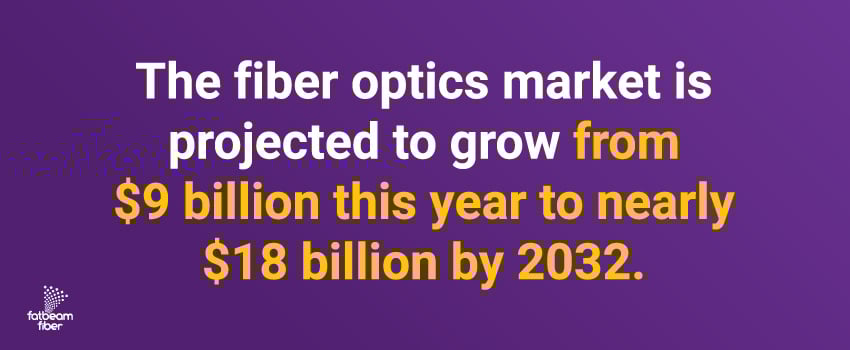
Fiber broadband is the gold standard for businesses that need high-speed, low-latency internet connections. It offers enhanced speeds and reliability by sending data as light signals via fiber optic cables – which could be why the fiber optics market is projected to grow from $9 billion this year to nearly $18 billion by 2032.1
- Speeds: Up to 10 Gbps or higher.
- Reliability: Extremely stable with minimal downtime.
- Best For: Large businesses, data-heavy operations, cloud computing, and VoIP services.
Cable Business Broadband
Cable broadband delivers high-speed internet through coaxial cables, similar to residential cable internet but with improved bandwidth and reliability for businesses. It leverages existing cable television infrastructure to offer a balance between performance and cost-effectiveness.
- Speeds: Typically 100 Mbps to 1 Gbps.
- Reliability: Good, but can slow down during peak hours due to shared infrastructure.
- Best For: Small to medium-sized businesses with moderate bandwidth needs.
DSL (Digital Subscriber Line) Business Broadband
DSL broadband operates over standard telephone lines, offering a budget-friendly option for businesses with limited connectivity choices. While not as fast as newer technologies, DSL remains a viable solution for many organizations.
- Speeds: 10 Mbps to 100 Mbps.
- Reliability: More stable than dial-up but slower than fiber or cable.
- Best For: Small businesses in rural areas or those with basic internet needs.
Fixed Wireless Business Broadband
Fixed wireless broadband is an innovative solution for businesses in locations with limited internet infrastructure. It uses radio signals to provide high-speed internet to businesses without requiring physical cables.
- Speeds: 25 Mbps to 1 Gbps.
- Reliability: Depends on weather conditions and obstacles between the antenna and tower.
- Best For: Businesses in remote or underserved areas without access to fiber or cable.
Satellite Business Broadband
Satellite broadband represents the ultimate solution for businesses in the most remote corners of the world, bringing internet access where traditional methods can’t reach. But while satellite connections offer consistent availability for businesses with no other options, they’re not the most reliable option.
- Speeds: 10 Mbps to 100 Mbps.
- Reliability: Prone to high latency, which can affect real-time applications.
- Best For: Businesses in rural or hard-to-reach locations with no other broadband options.
Dedicated vs. Shared: Which Business Broadband Fits?
Every business internet connection falls into one of two categories: shared or dedicated. The distinction determines how consistent your speeds stay, what guarantees you get, and how much you pay. It often matters more to daily performance than the underlying technology.
Shared Broadband
Cable, DSL, and most fixed wireless connections are shared. You split the available bandwidth with other users in your area, so speeds can dip during peak business hours when everyone is online. Shared connections are also usually asymmetrical, with upload speeds a fraction of the download speed. The upside is cost: shared broadband is the more affordable option and is widely available.
Dedicated Internet Access
A dedicated connection is a private line reserved entirely for your business. If you pay for 100 Mbps, you get exactly 100 Mbps at all times, with matching upload and download speeds. Dedicated Internet Access comes with stronger service level agreements, often guaranteeing 99.99% uptime and fast repair windows. It costs roughly two to four times more than shared broadband, which is the trade-off for guaranteed, consistent performance.
Which One Fits Your Business
Shared broadband suits small offices with email, browsing, and light cloud use, or any business watching its budget. Dedicated access fits mission-critical operations where downtime directly costs revenue, such as payment processing, VoIP, or cloud-dependent workflows.
Type 1 vs. Type 2 Access
A pricing detail many businesses miss: Type 1 access means the provider owns the network infrastructure into your building, while Type 2 means they resell another carrier's network. Type 2 connections often cost 10–30% more and can mean slower issue resolution, since repairs route through a second company.
How Much Does Business Broadband Cost? Pricing Guide
Business broadband pricing spans a wide range, from around $50 a month for entry-level connections to well over $1,500 for dedicated enterprise lines. What you actually pay comes down to three things: the connection type, the speed you need, and the service guarantees attached to it.
Monthly Cost by Connection Type
- Cable or DSL: $50–$100/month. Best for small offices with basic email and browsing.
- Standard fiber: $100–$300/month. Best for growing businesses running cloud applications.
- Premium or high-capacity fiber: $200–$500/month. Best for large or data-heavy operations.
- Dedicated Internet Access (DIA): $500–$1,500+/month. Best for mission-critical operations that can't tolerate downtime.[footnote 3]
Setup & Hidden Costs
The advertised monthly rate rarely tells the whole story. Plan for these on top of it:
- Installation and activation: $50–$500 for a standard setup.
- Fiber build-out: $500–$2,000 if fiber doesn't already reach your building.
- Equipment rental: $10–$20/month, or roughly $240–$720 over a three-year contract. Buying your own hardware often costs less upfront.
- Taxes and fees: typically add 5–15% to the monthly bill.
Watch promotional pricing too. Introductory rates often rise 20–40% after the first 12 to 24 months, so ask what the ongoing price will be once the deal ends.
What Drives the Price
Higher speeds cost more, and so does location: rural businesses often pay 25–50% more than urban ones because fewer providers compete there. Contract length matters as well, with month-to-month plans running 10–20% above multi-year agreements. Finally, the strength of the SLA affects price, since guaranteed uptime and faster repair commitments carry a premium worth paying when an outage would stop your operations.
How to Choose a Business Broadband Provider
Choosing the right business broadband solution will ultimately depend on your organization’s unique needs, but here are a few important considerations to keep in mind when comparing providers:
Uptime Guarantees
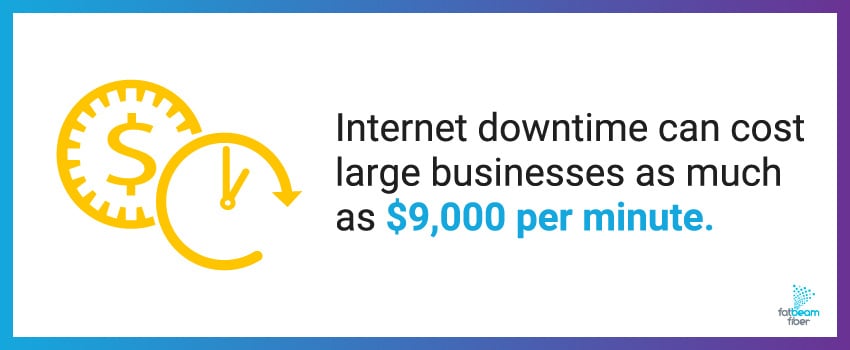
Internet downtime can cost large businesses as much as $9,000 per minute.2 Look for providers that offer service level agreements (SLAs) guaranteeing 99.9% uptime or better. Dedicated business broadband connections tend to offer more reliable performance than those delivered over shared networks.
Speed & Bandwidth
Assess your business’s internet usage to determine how much speed and bandwidth you need. Consider factors like:
- Number of employees using the network
- Cloud-based applications and storage
- VoIP phone systems and video conferencing
- Large file transfers and data backups
Businesses with heavy data needs will likely require fiber broadband, while smaller offices with light internet usage may find DSL or cable broadband sufficient.
Customer Support
Business broadband providers should offer 24/7 technical support with fast response times. Residential internet outages may take hours or days to resolve, but business connections need immediate attention to minimize operational disruptions.
Check customer reviews and service ratings to make sure that any potential provider has a strong track record of handling issues quickly and efficiently.
Scalability
Your broadband needs will evolve as your business grows, so be sure to choose a provider that can scale your internet connection to accommodate increasing bandwidth demands. Additionally, flexible contract terms allow you to upgrade speeds or switch to dedicated fiber broadband without major disruptions.
Security Features
Cyber threats are evolving fast, and businesses need broadband providers that offer built-in security. Look for features like:
- Firewall protection to block unauthorized access.
- DDoS mitigation to prevent network disruptions.
- VPN support for secure remote access.
Fiber optic broadband is the most secure option for businesses handling sensitive data, as it’s less vulnerable to threats than traditional copper-based connections like cable and DSL.
Cost & Value for Money
Compare pricing plans from different providers, but prioritize value over the lowest cost. While business broadband internet is generally more expensive than residential internet, the additional benefits – such as higher speeds, SLAs, and security – justify the investment for many organizations.
Fatbeam Fiber: Your Trusted Business Broadband Provider
The right business broadband solution can transform how your team works, communicates, and grows. It's not just about staying online – it's about creating an infrastructure that helps your organization reach its full potential.
At Fatbeam Fiber, we leverage our leading-class fiber optic backbone network to provide businesses with guaranteed, uninterrupted internet connectivity. Our dedicated internet access (DIA) fiber broadband solution delivers:
- Stringent SLAs with 99.99% uptime
- Fast speeds and only 55 ms latency
- Minimal 2 ms network jitter
- Symmetrical upload and download speeds
- High-capacity backbone with zero oversubscription
- Enterprise-grade security
We also extend our fiber broadband services to residential customers in our service areas to bring the same reliability and speed to homes that need high-performance internet.
Ready for a business broadband solution with no data caps, bursting fees, local loop charges, or hidden fees? We’ve got you covered. Contact the Fatbeam team today to learn more.
Business Broadband Internet FAQs
How much does business broadband cost per month?
Most small businesses pay $50–$100 a month for cable or DSL and $100–$300 for fiber. Dedicated Internet Access runs $500–$1,500 or more. On top of the monthly rate, budget for installation ($50–$500), possible fiber build-out ($500–$2,000), equipment rental ($10–$20 a month), and taxes adding 5–15%. Promotional rates often climb after the first year, so always ask what the price becomes once the introductory period ends.
What's the difference between business and home broadband?
Business broadband adds guarantees that home plans don't. You get an SLA with 99.9%+ uptime, 24/7 support, static IP addresses, better upload speeds, and usually no data caps. Home broadband is built for streaming and browsing on a best-effort basis with no uptime commitment. Business service typically costs 30–50% more than a comparable residential plan, and that premium buys reliability and support rather than just faster headline speeds.
Is dedicated internet better than shared broadband?
It depends on what downtime costs you. Dedicated internet gives you a private line with guaranteed, symmetrical bandwidth and strong SLAs, which is ideal when an outage stops revenue. Shared broadband splits capacity with other users in your area, so speeds can dip at peak times, but it costs far less. Small offices with light use rarely need dedicated service. Cloud-heavy or mission-critical operations usually do.
What is dedicated internet access (DIA) for business?
Dedicated Internet Access is a private internet connection reserved entirely for your business. If you buy 100 Mbps, you get 100 Mbps at all times, with matching upload and download speeds. DIA includes enterprise SLAs that guarantee uptime, often 99.99%, along with fast repair windows. It costs two to four times more than shared broadband, which makes sense for companies that can't afford slowdowns, dropped calls, or outages during business hours.
How much internet speed does my small business need?
Estimate roughly 3 Mbps per employee for email, browsing, and basic software, or 10 Mbps per employee for regular video calls and cloud backups. A 10-person office doing standard work needs around 30 Mbps, while the same team on frequent video conferencing needs closer to 100 Mbps. Add about 20% headroom for growth. Many businesses overpay, so test your real usage during peak hours before upgrading.
Can I use residential internet for my business?
You can, but it carries risks. Many residential plans prohibit commercial use in their terms of service, lack uptime guarantees, run on business-hours consumer support, and often impose data caps. For a solo freelancer working from home, a residential plan may be enough. Once customers, payments, or a team depend on the connection, business broadband's reliability, support, and static IPs usually justify the higher cost.
Is business broadband worth it for a small business?
For most, yes. If your business takes payments, runs cloud software, hosts video calls, or relies on a website, an outage directly costs money and customer trust. Business broadband's SLAs, faster support, and static IPs address exactly those risks. A very small or home-based operation with light internet use might manage on a quality residential plan, but the gap widens quickly as you add staff and tools.
What uptime guarantee should a business SLA include?
Look for at least 99.9% uptime, and ideally 99.99% for critical operations. The difference is bigger than it sounds: 99.9% still allows about 8.8 hours of downtime a year, while 99.99% cuts that to roughly 52 minutes. Also check how the provider measures downtime, whether scheduled maintenance is excluded from the calculation, and how quickly you have to file a claim to receive service credits.
Do I need a static IP address for my business?
Many businesses do. A static IP stays the same over time, which you need to host your own website or email server, run a VPN for remote staff, support certain VoIP systems, or allow secure remote access to office systems. Residential plans rarely include one, while business broadband usually does. If none of those apply to your operation, a dynamic IP address will work fine.
What internet speed do I need for video conferencing?
Plan for about 6 Mbps per user for HD video conferencing, and more when several people are on calls at once. A handful of simultaneous HD meetings can require 50 Mbps or more. Upload speed matters as much as download here, since you're sending video out, so a connection with symmetrical speeds, common on fiber and dedicated lines, handles conferencing far better than asymmetric cable.
Sources:

.png)